ReNamer Lite: Rule-based batch file renaming tool for Windows
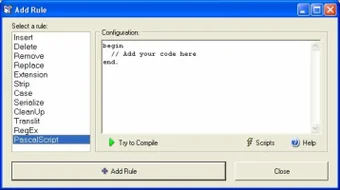
ReNamer Lite, developed by Denis Kozlov (den4b), is a Windows utility designed for renaming files and folders in bulk. It features a rule-based system that allows users to combine multiple renaming actions—such as adding prefixes or suffixes, replacing text, changing case, modifying file extensions, and more—into a sequence for batch processing. Advanced users can also apply Regular Expressions or the PascalScript rule to create more complex renaming logic.
Top Recommended Alternative

The program supports metadata-based renaming and Unicode filenames, allowing it to handle multilingual file names. These capabilities make ReNamer Lite useful for organizing large collections of files such as photos, music libraries, and documents.
Rule sets and advanced renaming options
ReNamer Lite organizes renaming tasks through rule sets, where multiple renaming actions can be combined and applied in sequence to selected files. Common operations include adding prefixes or suffixes, replacing text, changing letter case, removing bracketed content, adding number sequences, or modifying file extensions. These rule sets can be saved and reused, allowing users to apply consistent naming patterns across large batches of files.
For more advanced scenarios, the program includes support for Regular Expressions (RegEx) and the PascalScript rule, enabling complex pattern matching or custom renaming logic. ReNamer Lite can process both files and folders, and its support for Unicode filenames ensures compatibility with multilingual naming conventions.
Metadata support and batch renaming workflows
ReNamer Lite is designed for bulk file organization tasks, such as renaming large collections of photos, audio files, and documents. Its metadata support allows users to build filenames using information stored within files, including tags such as ID3v1, ID3v2, EXIF, and OLE.
The program can also use additional file information such as AVI metadata and checksum tags including MD5, CRC32, and SHA1, enabling more structured naming conventions for different types of files. Combined with its rule-based renaming system, these capabilities make ReNamer Lite useful for managing and standardizing large file collections.
Compatibility and limits of the Lite Edition
ReNamer Lite runs on Windows 2000 and later and can rename both files and folders using its rule-based system. This compatibility allows the program to function on a wide range of Windows environments, from older systems to more recent versions.
The Lite edition is free for personal use, but it includes certain limitations. In particular, users can create up to five renaming rules and save up to five presets within the program. For users who need greater flexibility, the Pro edition removes these limits, allowing an unlimited number of rules and presets for more complex or large-scale renaming workflows.
A practical solution for organizing files in bulk
ReNamer Lite offers a flexible way to organize files through rule-based batch renaming. Its ability to combine multiple actions, reuse rule sets, and incorporate metadata makes it well suited for managing large libraries of photos, music, and documents. Overall, the application provides both everyday users and experienced users with a dependable solution for structured file organization on Windows.